Gamifying Mobile Music Training Without Compromising Pedagogy
Context
Building a mobile musical training app from scratch
Meludia Melody is a mobile application dedicated to melodic interval recognition, one of the dimensions of the Meludia web application. Unlike the web app I improved, Melody was designed from scratch based on user feedback. Data collected from the web app had revealed two major frustrations: a lack of exercise customization and no visibility into progress. Mission: create a mobile app that addresses these needs with a gamification system that sustains motivation.
The challenge
Motivating without compromising musical pedagogy
Mobile users train in short sessions: on public transport, between classes, during a break. They need to immediately understand where they stand, what to do, and feel that they're progressing. Without this clear feedback loop, motivation erodes and the app gets abandoned.
Web app users had expressed two main frustrations: it was impossible to customize exercises (instruments, modulation) and there was no visibility into overall progress. The challenge was to turn these frustrations into features while creating a gamification system that motivates without falling into superficial addiction. How do you reward musical accuracy rather than click speed?
My role
UI/UX Designer - Designed from scratch
I designed Meludia Melody end-to-end over approximately 1 year, as the sole designer in collaboration with the PO and 2 developers (1-month sprints).
01 User research and product definition Analysis of web app user feedback to identify needs. About twenty tests with teachers and individuals to validate hypotheses and understand mobile usage patterns.
02 Scoring system design Design of a points system that rewards both response speed AND accuracy, with combo bonuses for consecutive correct answers. 3 score thresholds per exercise to motivate replaying.
03 Exercise customization Integration of user requests: instrument choice (guitar, piano), note modulation (half tone, quarter tone) to adjust difficulty.
04 Variety and progression structure Design of different exercise types (answer grid, central note identification, sequences) organized across 4 difficulty levels with approximately 20 exercises per level (80 exercises total). Dot-based progression system to visualize advancement.
05 Testing and iterations Regular user testing with teachers and individuals to validate the balance between gamification and pedagogy.
Design decisions
Gamification in service of learning
Scoring system calibrated for learning
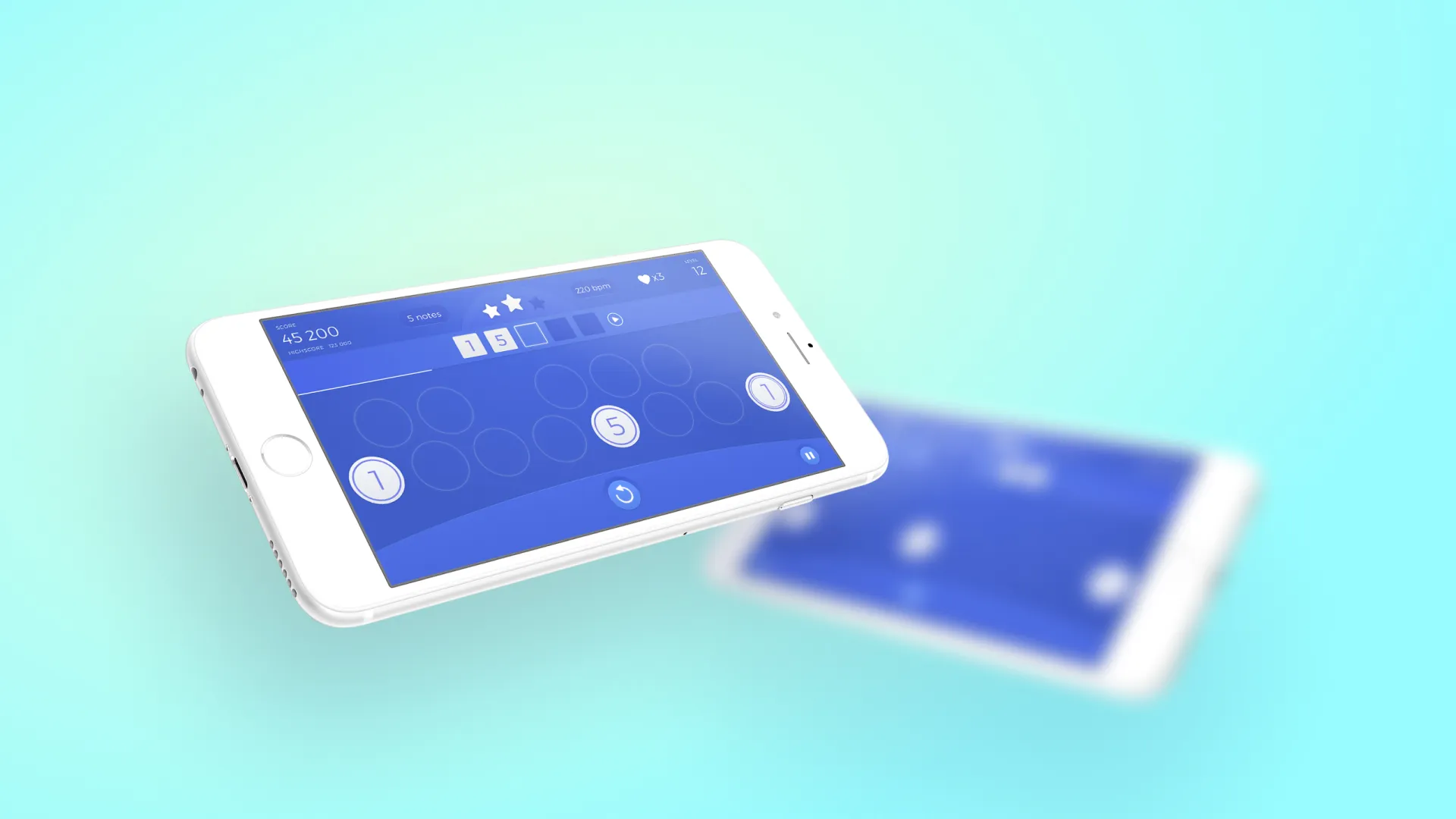
The score is displayed prominently in the top left of the screen, immediately visible. It rewards two dimensions: response speed AND accuracy. The combo system is represented by a multiplier (x2, x3, x5...) that increases as the user chains correct answers. Golden stars appear with each correct answer, creating immediate and rewarding visual feedback.
The interface is intentionally minimalist: a grid of circles to answer, the score at the top, stars for feedback, and essential indicators (bpm, number of notes). Nothing distracts from the musical exercise. This visual simplicity focuses attention on listening and responding, not on decorative elements.
Each exercise offers 3 score thresholds (represented by stars), giving a reason to replay and improve results. This system transforms repetitive training into a measurable personal challenge.
The critical trade-off: resisting the temptation of purely addictive scoring. No leaderboard, no social competition, no stressful timer. The score rewards musical progress, not click reflexes. Testing validated this approach: users replay to progress musically, not to beat other players.
Exercise variety, same skill
Exercises vary in visual format: multiple choice grid, central number to identify, sequences to complete. This variety maintains engagement while working the same musical skill (melodic interval recognition). Progress is visible through dots (small circles) at the bottom of some exercises, indicating where the user is in the series.
This format diversification avoids monotony while respecting the pedagogical goal. The user doesn't always do the same exercise visually, but they always work the same auditory ability.
Customization directly integrated
Web app users had long been asking for the ability to change instruments and modulate notes. In Melody, these options are accessible directly from the exercise screen: choice between guitar and piano, modulation by half tone or quarter tone.
This customization addresses two needs: beginners can train with the instrument they know, advanced users can increase difficulty with modulation. Requested by users AND teachers, it became a differentiating feature of Melody.
Progressive and clear structure
Approximately 80 exercises across 4 difficulty levels, with approximately 20 exercises per level. This structure gives users a clear roadmap: they know where they stand, what they've completed, what's left. Progress is visible, measurable, achievable.
App overview
An app adopted and well-rated
- Approximately 100,000 estimated downloads (50k Android measured, iOS estimated similar)
- 4.3/5 rating on the Google Play Store reflecting user satisfaction with gamification and customization
- Scoring system adopted with users replaying to improve their score thresholds on each exercise
- Customization praised directly addressing web app user requests (instrument choice, modulation)
- Clear progression structure with 80 exercises across 4 levels providing a visible roadmap
Reflections
Key takeaways
Gamification is a tool, not an end
A well-designed scoring system serves learning: it makes progress visible and sustains motivation. Poorly designed, it diverts attention from the pedagogical goal. The difference lies in what the score rewards. On Melody, we resisted the leaderboard and the stressful timer. The score rewards musical accuracy AND speed, but never speed alone. Immediate visual feedback (golden stars, visible multiplier) reinforces motivation without creating superficial addiction. This calibration was validated by testing: users replay to progress musically, not to beat imaginary opponents.
Listen to users, but filter the requests
Customization (instruments, modulation) came directly from web app user feedback. These features were adopted immediately. But not all requests are equal: we declined the leaderboard despite recurring requests, because it would have created counterproductive competition for learning. Designing means also knowing how to say no to good ideas that would undermine the main goal.
Designing from scratch vs improving the existing
Melody allowed me to design from scratch, unlike the web app where I had to improve existing flows. Both approaches are complementary: improving the existing teaches constraint and iteration, designing from scratch teaches vision and structure. Melody benefited from lessons learned on the web app: scoring system from the start, integrated customization, visible progression. It's the combination of both that creates value.